.png?width=1041&height=415&name=logo-cert-tool%20(1).png)
How Teachers/Admin Access ReAct:
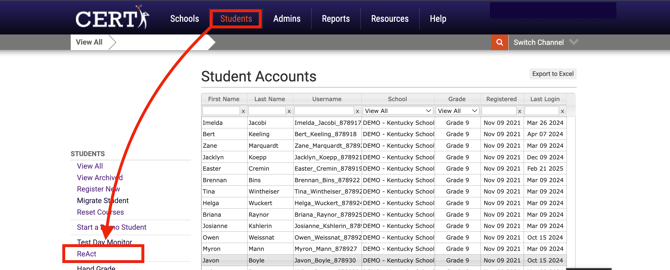
- From the Students page, select ReAct from the side menu.
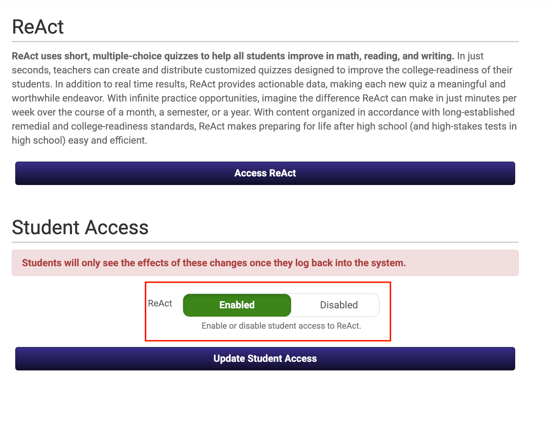
- Toggle ReAct to Enabled and Update Student Access.
- Once enabled, choose Access ReAct.
How Students Access ReAct:
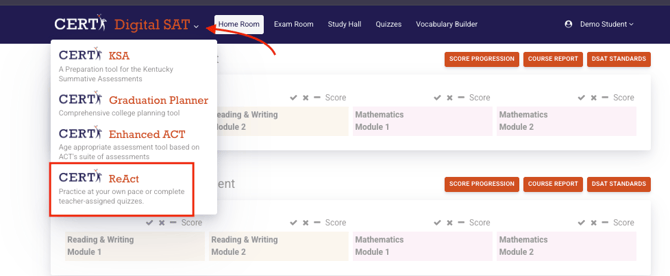
Students will choose the down arrow in the upper left corner at the end of the CERT platform they are in (Digital SAT, Enhanced ACT, etc.).
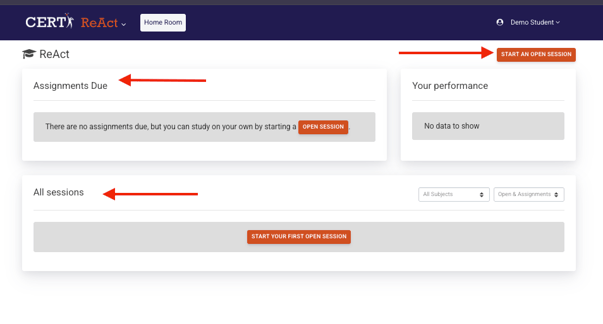
Once in ReAct, students will have access to unlimited practice through the open session feature in the top right. Assignments or assessments created and assigned by teachers will appear in the ASSIGNMENTS DUE section. Completed open sessions and assignments/assessments will appear under ALL SESSIONS. Students can access review features for the completed sessions here, too.